MIDI files, also known as SMF files, are a very compact format to store music. Usually, MIDI files have a .mid extensions, see also Wikipedia - Standard MIDI File. Only very exceptionally, actual waveforms or signals are stored in the MIDI files. Instead, MIDI files store events like "turn a note on", "turn a note off", "use a piano sound", "play at 120 quarter notes per minute", lyrics text for karaoke or track names. A song that takes 5 minutes, can be stored in perhaps only 20 kilobytes, compared to several megabytes of a MP3 file.

For a complete description of MIDI files, see Somascape for details.
In this post I am showing a detailed and commented analysis of a MIDI file. The file I am using is available on Wikipedia: Wikipedia File:MIDI sample.mid. Click on the file to hear it!
Here you can see in detail how this MIDI file looks inside! Let's first look at this file translated as a hexadecimal dump, with the ASCII for each line::
4D 54 68 64 00 00 00 06 00 01 00 06 01 E0 4D 54      MThd.........àMT
72 6B 00 00 00 30 00 FF 03 19 57 69 6B 69 70 65      rk...0.ÿ..Wikipe
64 69 61 20 4D 49 44 49 20 28 65 78 74 65 6E 64      dia MIDI (extend
65 64 29 00 FF 51 03 07 A1 20 00 FF 58 04 04 02      ed).ÿQ..¡ .ÿX...
18 08 00 FF 2F 00 4D 54 72 6B 00 00 05 24 00 FF      ..ÿ/.MTrk...$.ÿ
03 04 42 61 73 73 00 B0 00 79 00 20 00 00 C0 21      ..Bass.°.y. ..À!
00 90 2D 4E 82 00 80 2D 40 83 50 90 30 51 81 70      ..-N...-@.P.0Q.p
32 4F 04 80 30 40 81 6C 90 34 44 10 80 32 40 6E      2O..0@.l.4D..2@n
...etc ... etc ...
The file starts with ASCII "MThd" (hexadecimal 4D 54 68 64). This is always the case with a MIDI file. The rest of the contents is not that simple to read, it's in binary. Some parts can be seen in ASCII: it says "Wikipedia MID (extend)", this is the name of the first track. Also you can see "MTrk", that is the start of each track, and "Bass", that is the name of the track where the acoustic bass notes are stored.
Now let's look at the details again, but field by field. The file is divided in chunks (fragments, pieces), one header chunk and several track chunks, each track for one instrument, such as acoustic bass, piano, drums, etc.
| Hexadecimal | Type of data | Details | |
|---|---|---|---|
| 4D 54 68 64 | Chunk type ASCII "MThd" | Indicates a header chunk, file must start with "MThd" to be a MIDI file. | |
| 00 00 00 06 | Chunk length | Length of a header is always 6 bytes. It is stored in 4 bytes, big endian. Now follow 6 bytes of data. | |
| 00 01 | Format type of the MIDI file | 1 = multitrack. In this case, the next file shows that there will be 6 tracks. The other common format is 0 = single track. Format 0 files look just like a multitrack file, but they are guaranteed to have only one track. Format 2 files are not common.
As it is usual, each track contains the notes of one instrument. |
|
| 00 06 | Number of tracks | 6 tracks | |
| 01 e0 | Pulses per quarter note (ticks per beat=pulses per quarter note | 480 pulses. This number, together with tne number in the Set Tempo event below, gives the length of a MIDI pulse). This is the resolution of the MIDI file, this is, the smallest time that can be recorded. All times are multiple of this time. How long is a pulse? That's set by the Set Tempo event. In this file, there is only one Set Tempo event, but if the tempo changes (for example, a ritardando), then there could be many more further down in the file. | |
| (End of header and start of the 6 track chunks) | |||
| 4D 54 68 64 | Chunk type ASCII "MTrk" | Track chunk. Next four bytes have the track length. Currently, there is no other chunk type defined, only the header chunk and track chunks. Each track is typically used for one instrument, in this case Acoustic Bass, Piano, Drums, etc. | |
| 00 00 00 30 | Track chunk length | 48 bytes. The contents of a track chunk are always a delta time, in pulses, then a event, then a delta time, etc. | |
| 00 | Delta time | 0 pulses | |
| ff 03 19 57 69 6b 69 70 65 64 69 61 20 4d 49 44 49 20 28 65 78 74 65 6e 64 65 64 29 |
Track Name event | name="Wikipedia MIDI (extended)". This is the name of the track, it serves documentation purposes. The "track name" event is a so called "meta event". Meta events carry information aboutthe music in the MIDI file. They always start with 0xff, then the type of the Meta event (0x03) and then the length in the same format as a delta time, i.e. a variable number of bytes depending on the value. | |
| 00 | Delta time | 0 pulses | |
| ff 51 03 07 a1 20 | Set Tempo event | tempo=500000 microseconds per quarter note. Since the header gives the pulses per quarter note as 480, the duration of a pulse is 500000/480 = 1020 microseconds = 1.02 milliseconds. | |
| 00 | Delta time | 0 pulses | |
| ff 58 04 04 02 18 08 | Time Signature event | numerator=4 denominator=4 clocks_per_click=24 notated_32nd_notes_per_beat=8. Numerator and denominator show the music has a 4/4 time signature (4 quarter notes per bar. These values do not alter the playing tempo. Programs that render MIDI files to music notation use this field for the time signature. In musical notation, time signatures look like this:  . |
|
| 00 | Delta time | 0 pulses | |
| ff 2f 00 | End of Track event | The end of track event must be present at the end of each track, although it is redundant, since the track header has the length of the track in bytes. | |
| (Here ends track 0. As it should, track 0 only contains meta events) | |||
| 4D 54 68 64 | Chunk type ASCII "MTrk" | Track chunk | |
| 00 00 05 24 | Track chunk length | 1316 bytes | |
| 00 | Delta time | 0 pulses | |
| ff 03 04 42 61 73 73 | Track Name event | name="Bass". This name is for documentation purposes only. The instrument is defined below by the Program Change event. | |
| 00 | Delta time | 0 pulses | |
| b0 00 79 | Control Change event | channel=1 control=0 value=121. Controller 0 means "bank select". In many MIDI modules or syntesizers, there are many banks, each bank with up to 128 instruments- Since the value only has 7 bits, this would allow for only 128 banks. So controller 0 means the MSB (most significant byte) of the bank number, and controller 32, in the next event, sets the LSB (least significant byte).
According to the MIDI standard, channels are counted 1 to 16, but in the binary file, the channels are 0 to 15. |
|
| 00 | Delta time | 0 pulses | |
| 20 00 | Control Change event | channel=1 control=32 value=0. This complements the previous "control change" event. Controler 32 is bank select, just as controller 0, but controller 0 gives the MSB and controller 32 gives the LSB, each of seven bits. So these two control change commands set bank MSB 121 LSB 0. In many MIDI moduiles and syntesizers, this is the General Midi (GM) bank, one of the most used banks.
The instruments of the GM bank are standard, for example: 0=Piano, 1=Bright Piano, 20=Church Organ, 25=Nylon acoustic guitar (search internet for "list of GM instruments") |
|
| 00 | Delta time | 0 pulses | |
| c0 21 | Program Change event | channel=1 program=33. If this message gets to a General Midi (GM) sound module, 33 means "Acoustic Bass". Since the channel number is 0, all Note On and Note Off messages with channel=1 will make a Acousic Bass sound:  . . | |
| 00 | Delta time | 0 pulses | |
| 90 2d 4e | Note On event | channel=1 note=45 velocity=78. Note number 45 is a A2 at 110 Hz. Velocity values go from 0 (silent) to 127 (maximum) so 78 is about 2/3 volume. In musical notation: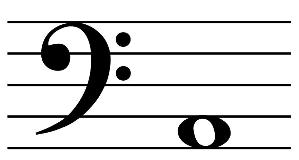 |
|
| 82 00 | Delta time | 256 pulses. Since the Set Tempo event in track 0 and the pulses per quarter note of the header have set the duration of a pulse to 1020 microseconds, this delta will translate to a time of 500000/480*256=266666 microseconds, about 266.6 milliseconds. | |
| 80 2d 40 | Note Off event | channel=1 note=45 velocity=64. This turnos off the previous Note On of the note number 45. Velocity=64 means that the note should not be turned off abruply, as it would with velocity=0 | |
| 83 50 | Delta time | 464 pulses. 3*128+5*16+0= | |
| 90 30 51 | Note On event | channel=1 note=48 velocity=81. The event status byte 0x90 means Note On on channel 0. The next Note On event in the track does not have it's own 0x90 event status byte, it is using this event's event status byte. This is called "running status". | |
| 81 70 | Delta time | 240 pulses | |
| 32 4f | Note On event | channel=1 note=50 velocity=79. Unlike the previous Note On event, this event does not start with the event status byte 0x90. It is a so called "running status event", i.e. an event where the event status byte is absent and should be taken from the last channel event in this track. This saves one byte per event. | |
| 04 | Delta time | 4 pulses | |
| ... and so on ... | |||
| 2d 00 | Note On event | channel=1 note=45 velocity=0. When using running note on events, this is the shortest way to turn the note off again. No need for a note off event, just alter the velocity of the note to zero. | |
| 00 | Delta time | 0 pulses | |
| ff 2f 00 | End of Track event | ||
| (end of first track) | |||
| 4D 54 68 64 | ASCII "MTrk" | Track chunk | |
| 00 00 07 8c | Track chunk length | 1932 bytes | |
| 00 | Delta time | 0 pulses | |
| ff 03 05 50 69 61 6e 6f | Track Name event | name=Piano | |
| 00 | Delta time | 0 pulses | |
| b1 00 79 | Control Change event | channel=2 control=0 value=121 | |
| 00 | Delta time | 0 pulses | |
| 20 00 | Control Change event | channel=2 control=32 value=0 | |
| 00 | Delta time | 0 pulses | |
| c1 00 | Program Change event | channel=2 program=0 | |
| 84 9c 00 | Delta time | 69120 pulses | |
| 91 2d 7c | Note On event | channel=2 note=45 velocity=124 | |
| 00 | Delta time | 0 pulses | |
| 39 78 | Note On event | channel=2 note=57 velocity=120 | |
| 83 07 | Delta time | 391 pulses | |
| 2d 00 | Note On event | channel=2 note=45 velocity=0 | |
| 51 | Delta time | 81 pulses | |
| 39 00 | Note On event | channel=2 note=57 velocity=0 | |
| .... and so on ... | |||
| 2c | Delta time | 44 pulses | |
| 99 2a 6d | Note On event | channel=10 note=42 velocity=109 | |
| 64 | Delta time | 100 pulses | |
| 89 2a 40 | Note Off event | channel=10 note=42 velocity=64 | |
| 00 | Delta time | 0 pulses | |
| ff 2f 00 | End of Track event | ||
| 4D 54 68 64 | Chunk type ASCII "MTrk" | Track chunk | |
| 00 00 0c 57 | Track chunk length | 3159 bytes | |
| 00 | Delta time | 0 pulses | |
| ff 03 05 44 72 75 6d 73 | Track Name event | name=Drums | |
| 00 | Delta time | 0 pulses | |
| b9 00 78 | Control Change event | channel=9 control=0 value=120 | |
| 00 | Delta time | 0 pulses | |
| 20 00 | Control Change event | channel=9 control=32 value=0 | |
| 00 | Delta time | 0 pulses | |
| c9 00 | Program Change event | channel=9 program=0. Program 0 is the piano. | |
| ... and so on, now follow four more tracks until the end of the last track ... | |||
| 00 | Delta time | 0 pulses | |
| ff 2f 00 | End of Track event | The 6 tracks can have different length, in fact, track 0 lasts 0 seconds. The longest track determines the length of the music. | |
| (end of file) | |||

The tracks of this file
These are the tracks, instruments and channel numbers (In the MIDI standard, channels are counted 1 to 16).- Track 0: set tempo event
- Track 1: Acoustic bass. Channel 1
- Track 2: Piano. Channel 2
- Track 3: Hi Hat. Channel 10. Channel 10 is always used for all drum type instruments like snare drum, hi-hat, cymbals, or bongos. The note number indicates the instrument.
- Track 4: Drums. Channel 10. Another track with drums
- Track 5: Jazz Guitar. Channel 3
Interesting links
- Wikipedia - Standard MIDI File.
- Somascape. A well explained documentation of MIDI files.
- Standard MIDI files (SMF) Specification
Comments
Post a Comment